

Badge ID, PIN and time zone
Enter badge ID, PIN and time zone in the employee form.
The device recognises employees by the badge ID stored with the person in Odoo. Badges cannot be taught on the device.
Entering the badge ID
- In Odoo open “Employees” and choose the person.
- Open the “Settings” tab.
- Under “Attendance/Point of Sale”, click into the field “RFID/Badge Number”.
- Hold the badge to a USB badge reader at the PC. The reader types the ID into the field.
- Save.
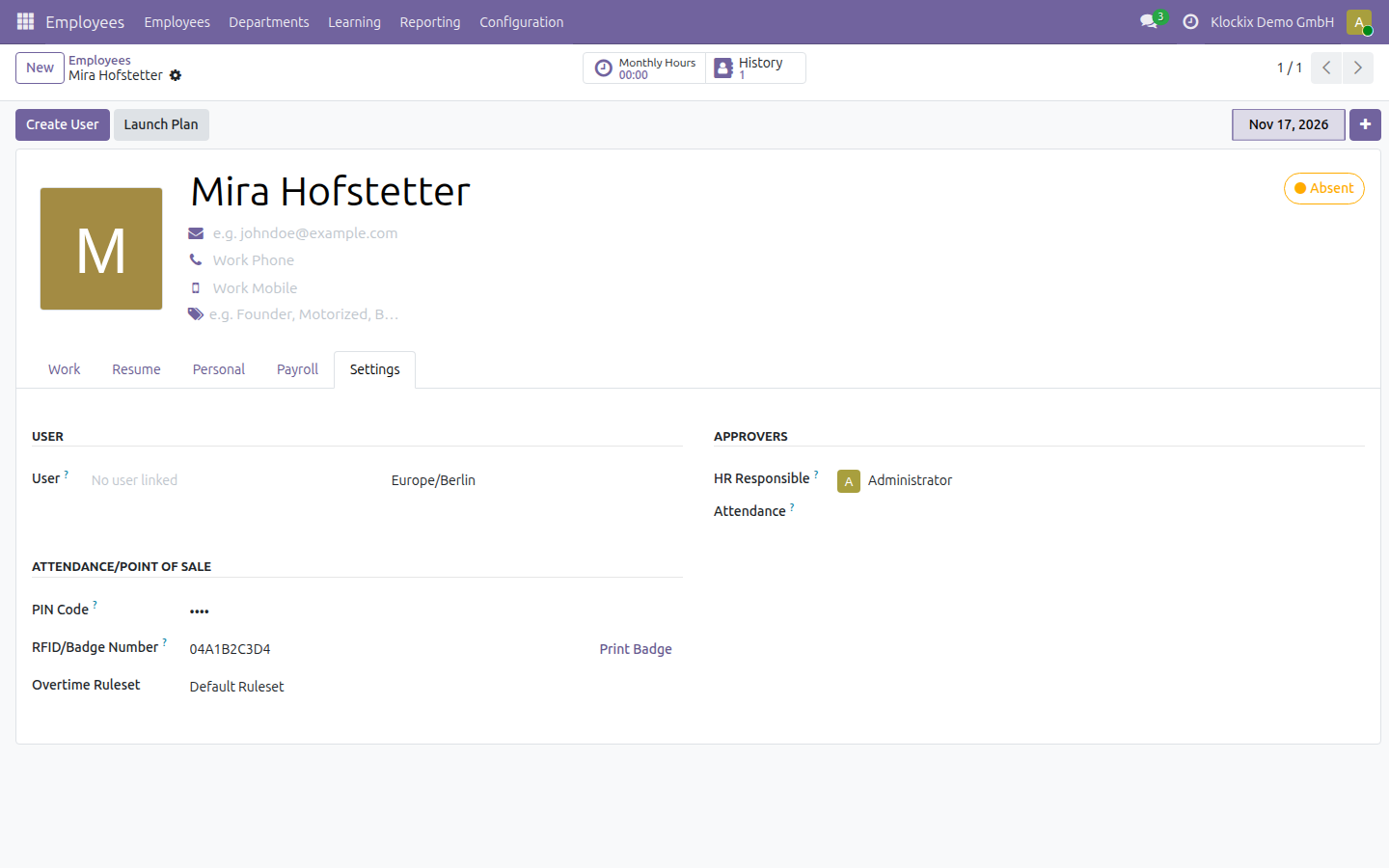
The USB reader must output the ID the way the device reads it: as hex characters without separators, in the same order, for example 04E2F3A4B5C6D7. Many readers can be configured for this. An ID has at most 18 characters.
- With an API key, upper and lower case do not matter.
- With a kiosk link, Odoo compares exactly. The ID then has to be in capitals.
Checking
- Tap the badge on the device.
- If the name appears, the ID is right.
- If the device shows “Badge not known”, the first 4 and the last 2 characters of the ID as the device reads it appear below. Compare them with the entry in Odoo.
A device with an API key syncs the employee list every 10 minutes by default. A new ID can be missing until then.
PIN for the selection without badge
The selection “Without badge: choose name” on the device asks for the PIN from the field “PIN Code” in the same section.
- With an API key everyone needs a PIN there. People without a PIN appear greyed out in the list on the device.
- With a kiosk link, Odoo checks the PIN if “Employee PIN Identification” is switched on in the Attendances settings.
Time zone of employees
Odoo calculates the hours worked today and the day boundary in the time zone of the person, not in that of the site. If it differs, the device shows other hours than expected.
- On the “Settings” tab, set the time zone to the right of “User” to the time zone of the site, for example “Europe/Berlin”.
- Keep the working schedule of the person in the same time zone.
Whoever clocks in at sites in different time zones gets the time zone of the main site. The time on the device still follows the site it stands at. If time zones differ, the Fleet Console reports: “… people have a different time zone in Odoo than the site.”